User Manuals Mobiliis Personal Account Guide
5. Finding your way around
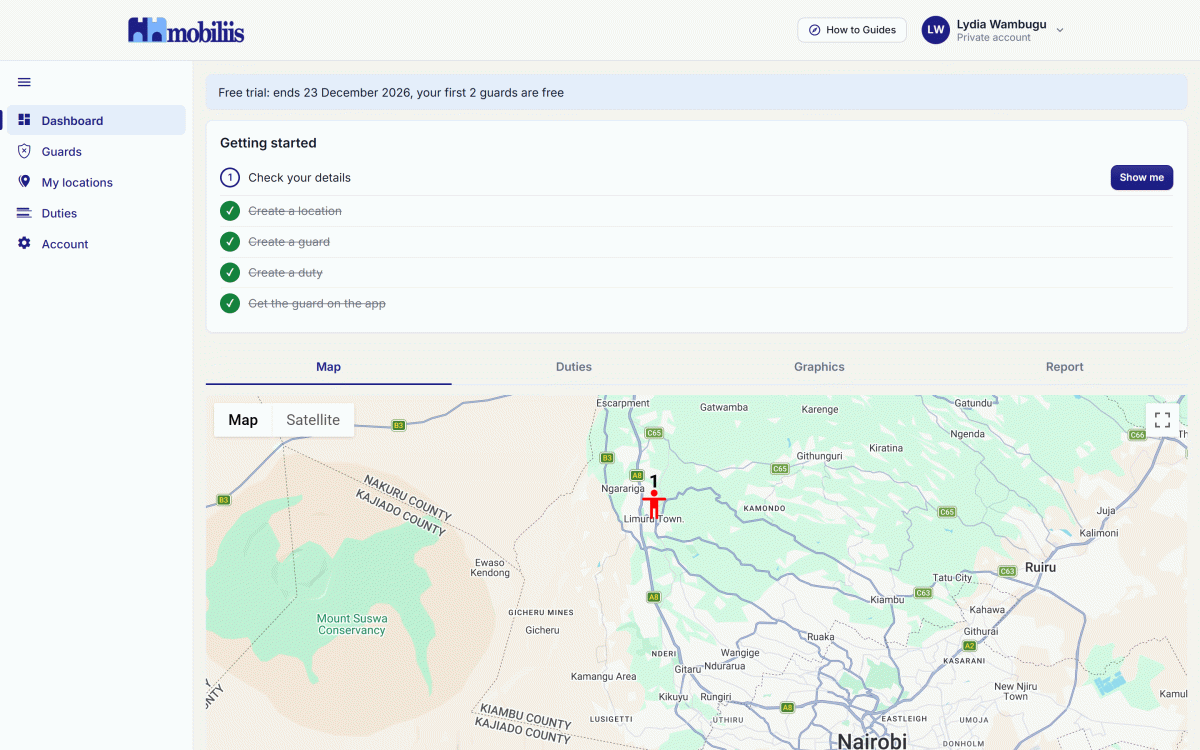
- Side menu: Dashboard, Guards, My locations, Duties, Account. Duties opens the Duties tab of the dashboard.
- Top bar: the Mobiliis logo, How to Guides, and your initials or photo with your name and "Private account". Click it for My details and Sign out.
- How to Guides: step-by-step walk-throughs on the real pages, in the groups "Set up", "Change or remove", "Move people and suspend", "Day to day" and "Your account". Choose one and press Show me.
Getting started
When you first sign in, the dashboard shows a Getting started card with 5 steps:
- Check your details
- Create a location
- Create a guard
- Create a duty
- Get the guard on the app